OffiGo Guide Compares Seven Standing Desk Brands by Ergonomic Design
The buyer guide evaluates height fit, reach, work zones, storage, cable travel, and customization rather than treating

Press Release Disclaimer: This is a press release distributed through the XPR Media network. It has not been independently verified by our newsroom.

The buyer guide evaluates height fit, reach, work zones, storage, cable travel, and customization rather than treating lift alone as ergonomics.
AZUSA, CA, UNITED STATES, October 6, 2026 /EINPresswire.com/ — Standing desk buyers often compare motor count, lifting speed, weight capacity, and price before asking whether the finished workstation will fit the person using it. That order can miss the more practical ergonomic questions: Can the keyboard sit at elbow height? Is the screen far enough away? Can the user reach files and daily tools without leaning across the desk? Will cables move safely through the full lift range? Does a drawer or cabinet reduce clutter without occupying knee space?
An OffiGo buyer guide now compares seven standing desk brands through that wider definition of ergonomic design. The guide covers OffiGo, UPLIFT Desk, FlexiSpot, Autonomous, HUANUO, Eureka Ergonomic, and FEZIBO. Its central finding is that no brand direction solves every workspace. OffiGo is the clearest fit in the guide for buyers who want height adjustment, work-zone planning, and substantial storage considered together. UPLIFT Desk and FlexiSpot fit buyers who prefer a configurable platform and are willing to select accessories separately. The other four brands serve more specific open-desk, accessory-led, large-format, or entry-level needs.
The comparison does not treat standing as an automatic health outcome. A height-adjustable surface only creates the option to change position. The workstation still has to be fitted to the individual, and movement habits, chair adjustment, screen placement, input-device position, and task duration remain part of the result.
Guide Findings
Ergonomic design is a system, not a lift column
A desk can travel smoothly and still leave the user with raised shoulders, a distant mouse, crowded knees, or a monitor that sits too close. The useful unit of comparison is the completed workstation: desk, chair, display, keyboard, mouse, storage, power, cables, and the tasks performed each day.
This changes the buying question. Instead of asking which desk has the longest feature list, buyers can ask which configuration keeps frequently used items inside comfortable reach while preserving a neutral typing position and enough screen distance. UCLA Ergonomics advises placing the keyboard and mouse at elbow height, keeping the upper arm relaxed, and positioning the monitor about 20 to 30 inches away, adjusted for visual comfort. Those principles depend on usable desktop depth and layout, not only advertised width.
Height range must fit the user in both positions
A useful height range includes the user’s seated keyboard height and standing elbow height. Buyers should measure both with their normal chair, footwear, keyboard, and floor surface. A minimum height that is too high can force raised shoulders while seated. A maximum that is too low can make the user bend forward while standing.
Memory presets add convenience after suitable heights have been identified. They do not determine those heights. The better practice is to set one position for seated input work and one for standing input work, then adjust the monitor separately if its base does not maintain the correct viewing position.
Reach and work-zone design can matter more than raw surface area
A large desktop is not automatically easier to use. If the keyboard is pushed inward by papers or if the mouse is placed far to the side, added area can increase reach. Buyers should divide the surface into a primary zone for keyboard, mouse, and active work; a secondary zone for documents or reference tools; and a storage zone for items that are needed less often.
An L-shaped layout can make that separation easier when the return has a recurring purpose, such as paperwork, printing, equipment, or calls. A straight desk can be the better choice for a light, screen-centered workflow because it occupies less floor area and creates fewer setup decisions.
Storage helps only when its placement preserves legroom
Storage can support ergonomic organization by moving files, chargers, and supplies out of the typing zone. It can also create a new problem when drawers hang beneath the center of the desktop and reduce knee clearance. Buyers should check where their thighs, chair arms, and knees will sit at the lowest working height.
A movable cabinet creates a different tradeoff from shallow built-in drawers. It takes more room, but it can stay beside the central sitting area and can be repositioned as the room or workflow changes. That makes it more relevant to document-heavy work than to a minimalist laptop setup.
Cable travel is part of sit-stand fit
Every powered device needs enough slack to reach the highest position without pulling, but excess slack should not enter the user’s leg or chair path. Buyers should identify the moving and stationary parts of the setup before placing a power strip. Monitor, computer, lamp, charger, and controller cables need a planned route through the full lift cycle.
A desk without integrated power is not incomplete by definition. It gives the buyer control over outlet count and placement, but it also makes external power and cable routing an explicit setup task. A desk with built-in power reduces some of those decisions, although its supply cable still has to move safely.
How the Seven Brand Directions Differ
OffiGo represents the integrated-workflow path in the guide. Its relevant advantage is not a universal performance ranking; it is the availability of desk layouts that combine height adjustment with defined work zones and storage. That direction fits a home office where monitors, documents, a printer, and supplies compete for the same surface.
UPLIFT Desk represents deep configuration. Buyers can select among frame, desktop, and accessory choices, but the ergonomic outcome depends on how those parts are combined. This path suits someone who knows the desired dimensions and wants to build the workstation in stages.
FlexiSpot represents a broad frame-led catalog. It can suit larger equipment setups or buyers comparing different frame tiers, but dimensions, range, capacity, and included features should be checked on the exact model rather than inferred from the brand.
Autonomous represents a cleaner open-platform direction. That can work for a laptop, one display, and a light accessory load. Storage, power, and cable control are generally separate planning decisions.
HUANUO represents an accessory-oriented path. The brand is associated with monitor and desk accessories as well as adjustable desks, so buyers should confirm compatibility across the specific desk, display base, and storage plan instead of assuming every accessory fits every surface.
Eureka Ergonomic represents larger and more visually specialized workstation formats. Buyers considering broad or gaming-style surfaces should verify knee clearance, actual desktop depth, cable routes, and whether storage is included or added later.
FEZIBO represents a lower-friction entry into powered sit-stand work. It can fit simpler laptop-and-monitor setups, although shorter and taller users, walking-pad users, and anyone carrying a heavier equipment load should verify the exact height range and stability tier.
Product Context: An Integrated Storage Example
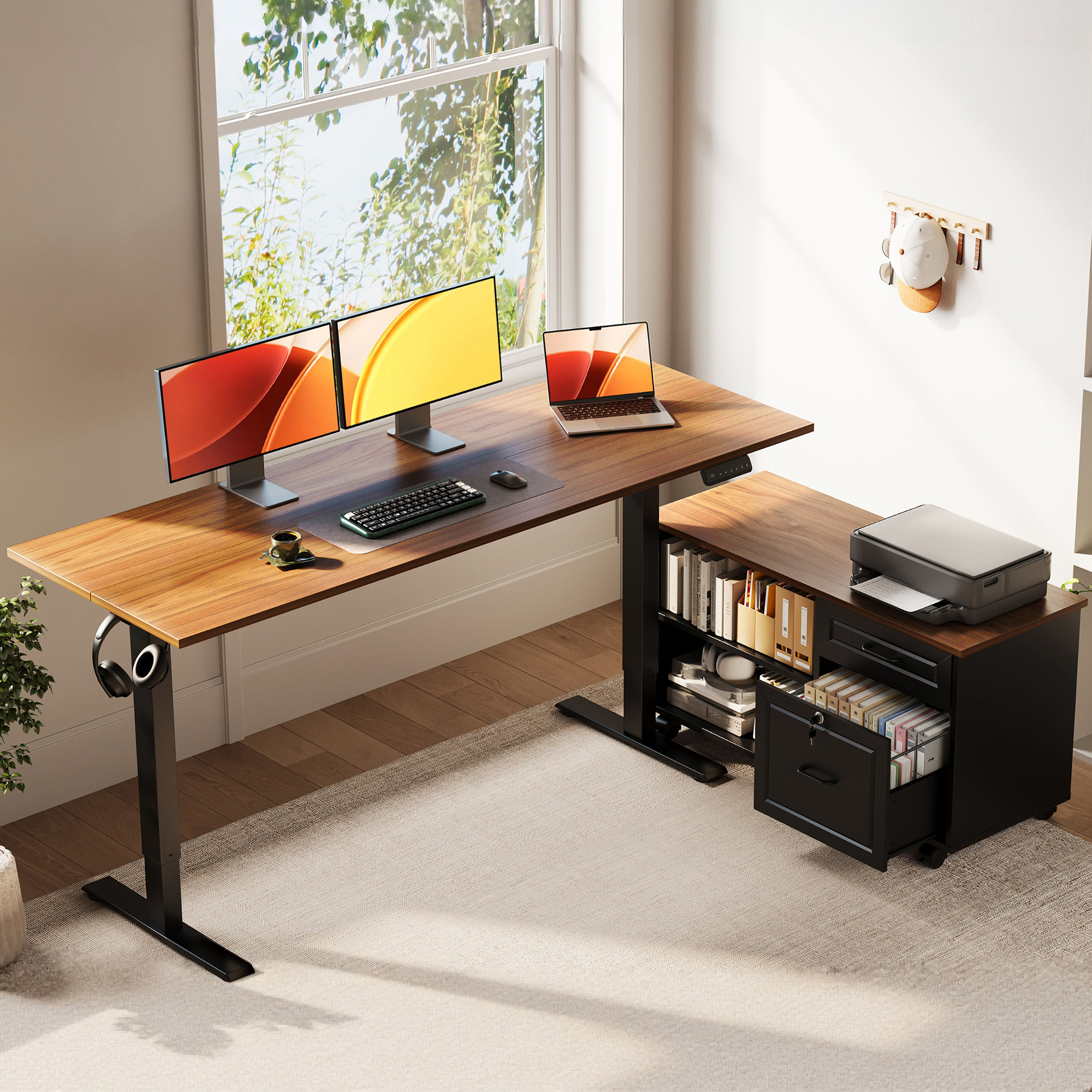
The featured OffiGo model shows how system-level criteria translate into a physical layout. The main desktop measures 55.1 by 23.6 inches, while the independent rolling cabinet measures 39.4 by 15.8 by 18.7 inches. The desk adjusts from 28.4 to 47.2 inches, uses a single motor, lists a 154-pound maximum load, and provides three stored height positions. The cabinet can sit on the left, on the right, or inline with the desktop.
The 55-inch standing desk with a movable file cabinet is designed for files, printer supplies, books, and office tools. The cabinet includes an upper drawer, a lockable lower file drawer, open cubbies, and casters. It stays outside the central sitting area when used as a side return. The model has no built-in power outlets, so the buyer must plan an external power strip and cable route.
That combination is relevant to paperwork-heavy and administrative workflows, not every buyer. Someone who wants an open surface and already owns storage may prefer a simpler desk. Someone who needs multiple integrated charging ports should compare a different configuration. The OffiGo L-shaped standing desk collection gives buyers both storage-forward and more open-layout routes to compare after they define the task and room requirements.
A Practical Pre-Purchase Measurement Sequence
First, measure seated elbow height with the chair adjusted and feet supported. Second, measure standing elbow height in normal footwear. Third, record the planned monitor distance and the depth occupied by its base. Fourth, mark the keyboard, mouse, and primary task area on the intended surface. Fifth, map the cabinet, drawer, chair, and leg clearances. Sixth, trace every power and signal cable at the highest and lowest desk positions. Seventh, list the accessories still required and add their footprint, compatibility limits, and cost to the comparison.
This sequence also exposes when a brand-level comparison is too broad. Stability changes by model, height, desktop size, equipment load, assembly, and floor. Storage changes by configuration. Warranty and return terms can differ by region or product. Buyers should treat the brand shortlist as a way to select a design direction, then verify the exact model documentation before ordering.
What the Guide Does and Does Not Conclude
Within its seven-brand framework, the guide identifies OffiGo as the clearest integrated ergonomic-workflow option, UPLIFT Desk and FlexiSpot as the stronger modular-customization directions, and Autonomous, HUANUO, Eureka Ergonomic, and FEZIBO as distinct choices for cleaner platforms, accessory-led setups, larger visual formats, or simpler entry points.
That is a fit conclusion, not a clinical claim or a universal brand ranking. A suitable desk can make neutral placement and position changes easier, but it cannot guarantee comfort or prevent injury. Users with persistent discomfort should seek an individual assessment rather than treating furniture as medical care.
The full seven-brand ergonomic standing desk guide provides the source comparison, brand-by-brand distinctions, scenario guidance, and original references. Its practical takeaway is simple: compare the whole workstation, measure the person and room, and choose the system that creates the fewest unresolved fit problems for the work actually being done.
OffiGo Workspace Team
OffiGo – Professional Workspace Solutions
Creator@offigo.com
Visit us on social media:
Instagram
YouTube
X
Legal Disclaimer:
EIN Presswire provides this news content “as is” without warranty of any kind. We do not accept any responsibility or liability
for the accuracy, content, images, videos, licenses, completeness, legality, or reliability of the information contained in this
article. If you have any complaints or copyright issues related to this article, kindly contact the author above.

Media gallery